

How this free feature can be a powerful tool to keep venues visible and easy to book
For many community venues – whether a busy town hall, a church, sports centre, and every type of venue in between – having an online presence can make a huge difference to how easily people can discover events and make a booking. But the reality is that not every venue has the resources to build and maintain a full website, and many are run by small committees or volunteers who already have enough to manage.
This is why Hallmaster provides every venue that needs one with a built-in Basic Webpage. It’s designed to give venues a clear, easy-to-navigate online space where customers can quickly see availability, browse upcoming events, and submit booking requests – without any technical setup, design work, or additional cost.
The Basic Webpage is included with every Hallmaster licence and is ready to use as soon as the venue chooses to activate it. Simple, effective, and fully integrated with the booking system, it has become one of the most valued features among Hallmaster users.
Why a Webpage Matters for Community Venues
Many venues prefer to operate quietly, without running a full website or social media presence. Others would love a website but simply don’t have the time, money or technical know-how to set one up. The Basic Webpage, with its own unique domain reference, bridges this gap by giving customers a user-friendly way to see what’s happening at the venue and how to book, without requiring the venue to maintain a separate website.
Because the webpage pulls its information directly from the venue’s Hallmaster account, it remains accurate and up to date at all times. If a booking changes or a new event appears on the calendar, the public page updates automatically.
This means:
- No duplicated admin work
- No out-of-date availability
- No technical maintenance needed
- No need to register a domain name and hosting
Venues can focus on running their space while Hallmaster handles the online visibility.
What the Basic Webpage Includes
Designed to be simple but powerful, the Basic Webpage can display whichever panels a venue chooses to make public, such as:
- The Main Scheduler
- A Weekly Diary View
- Venue details and key information
- Booking request links
The page layout is clean and easy to navigate, making it simple for customers to find what they need. Whether someone wants to book a children’s party, check if a regular class is running, or see which evenings are free, the information is all there – organised and automatically formatted.
Venues receive a unique, easy-to-remember web address, included with their Hallmaster licence. This link can be shared on noticeboards, local newsletters, parish magazines, posters, social media, or anywhere else the venue promotes its activities. A QR code is also provided for use in physical materials, making access even easier.
Example Web Page: Fortnighty Hall
A good example of the Basic Webpage in action is Fortnighty Hall, a well-used community venue that relies on Hallmaster to manage its bookings and share its calendar with the public.
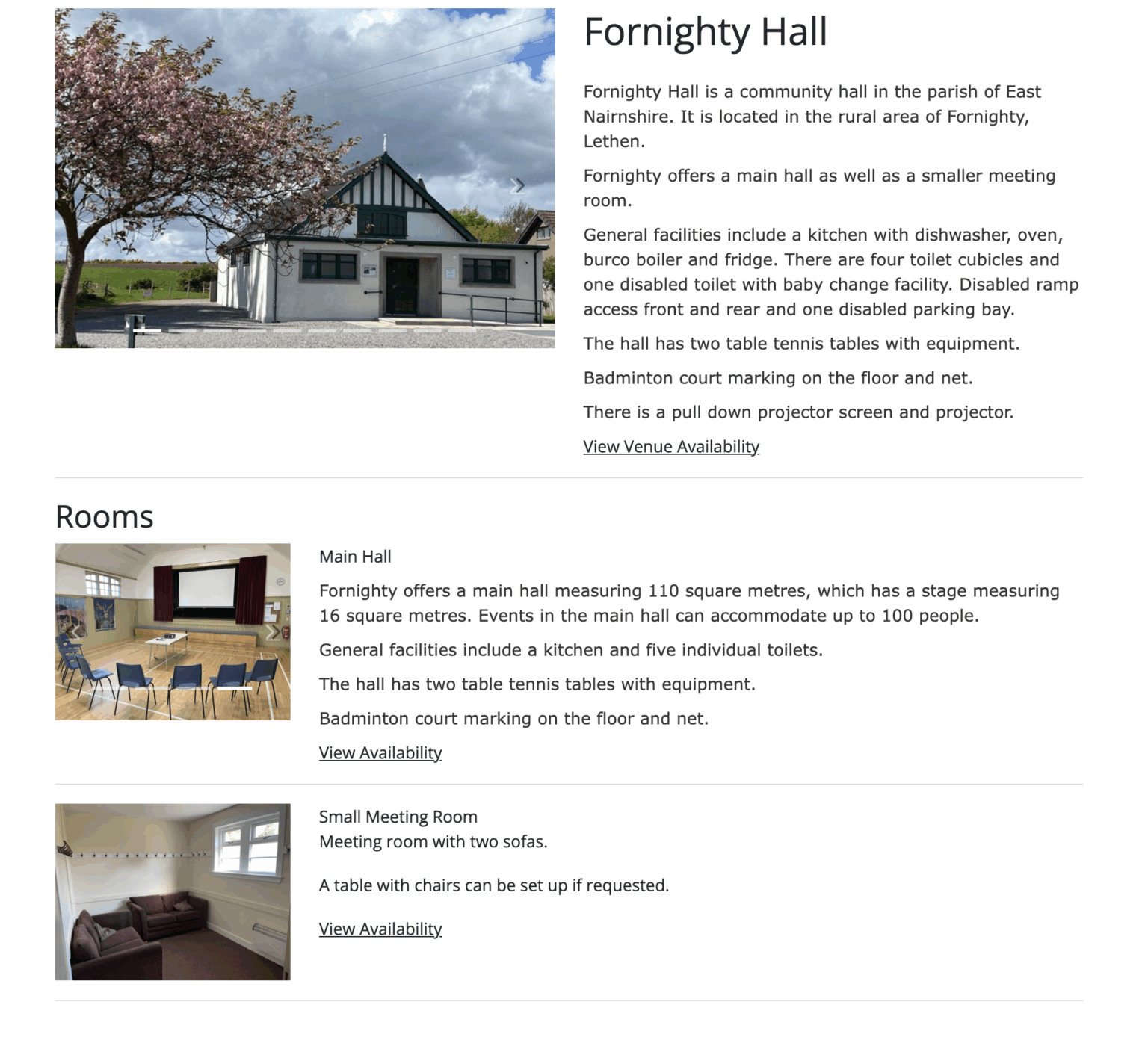
Fortnighty Hall uses the page to show its live diary, allowing local residents and regular hirers to see availability at a glance. The page updates instantly as bookings are added or changed, meaning the hall never has to worry about mismatched information or out-of-date listings.
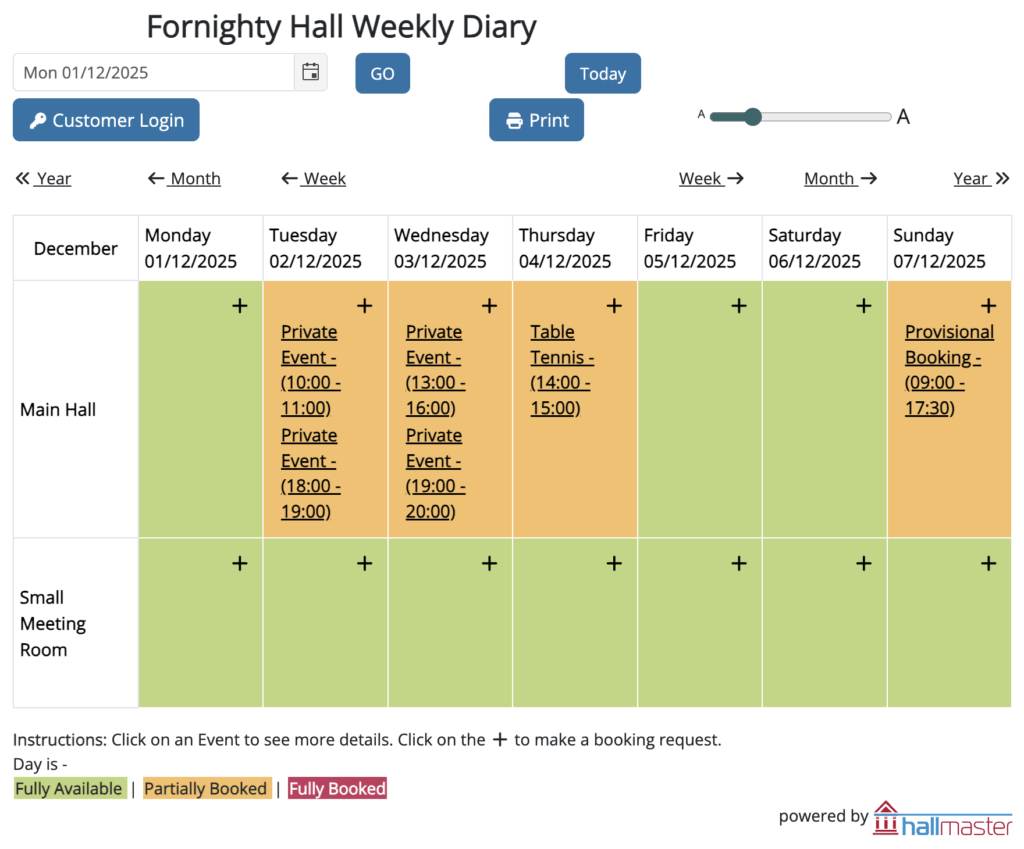
This straightforward setup works perfectly for them. It keeps the community informed, reduces unnecessary enquiries, and avoids the need to run and maintain a separate website. It’s a clear example of how small venues can present a modern, accessible online presence with minimal effort.
Customising the Web Address
One of the most appreciated features of the Basic Webpage is the ability to customise the venue’s web address to make it memorable and relevant. The system automatically suggests a “Place Address” (URL), but venues can modify it to better reflect their name or identity.
Setting this up is simple:
Step 1: Choose What to Display
- Go to Admin > Website Integration
- Select the Basic Web Page tab
- Choose which panels or calendars you want to display
- Use the preview button to see how it will look
- Click Save once happy
Step 2: Set the Venue’s Web Address
- Check the URL box under any of the tabs in the Website Integration section
- The venue’s name will already be suggested in the web address field
- Use the suggested address, or manually create your own
- Save the chosen address, and copy if needed
After this, the venue can share the link anywhere – email footers, social media, physical posters, community magazines – or even display the QR code around the hall.
For many smaller venues, this becomes their primary online hub.
Providing a Modern Presence Without Complexity
The Basic Webpage is designed with the realities of community venues in mind. Budgets vary, technical confidence varies, and the amount of available time varies even more. Despite these challenges, these venues remain vital to local communities, providing space for events, social groups, physical activity, learning opportunities, and countless gatherings that bring people together.
Hallmaster’s Basic Webpage helps these venues stay accessible and visible without adding to their workload. It offers an easy way to share availability, keep information accurate, and simplify the booking process – all while eliminating the need for a full website.
For venues like Fortnighty Hall and many others, it has become a practical and reliable solution that supports both administrators and the local community.
If a venue ever needs help setting up or customising its Basic Webpage, the Hallmaster team is always available to assist.